Find the approved selection.
Keep the chosen product, customer confirmation, and contractor review together. Know which checks are still open.
For the people who run the remodel
One connected workspace for remodeling companies—from the first walkthrough to the final invoice. Capture details once, build clearer proposals, and give production the whole story.
No credit card. Your whole team can try it.

From walkthrough to signed work
Turn the details you captured into a scope, price it with your company’s rates, and give your customer clear options. Keep the decisions with the work as it moves into production.
Keep the measurements, photos, and customer priorities.
Review the work, quantities, assumptions, and exclusions.
Use saved company rates; review gaps and adjustments.
Give each choice its own scope and reviewed price.
Carry the selected scope and commitments into the job.
Less writing the same story twice. Walkthrough context stays with the estimate and proposal. Review what changes at each step, with the source still close by.
Follow the Whitaker primary bath with Alder & Stone, our fictional Raleigh remodeling company. Choose each step below at your own pace—no account needed.
You control the pace · illustrated workflow
Fictional project data
Claire & Ben Whitaker · Oakwood
“Keep the window and the toilet where they are. Claire wants an easier-entry shower. Price a tiled shower and an insert so they can compare. The vanity needs more drawer space.”Walkthrough excerpt
Same room. Two complete scopes.
Explore the example options below.
Custom tile, waterproofing, a recessed niche, and glass enclosure. Existing window and toilet location remain.
Awarded · Custom tiled shower · $28,650
One decision, with its history. Customer choices, contractor review, and field-fit checks stay distinct. A favorite is a starting point.
Daniel Brooks · Project manager
The wall build-up needs a field check before the trim order can be released.
Eli checks the finished wall thickness Monday. Daniel records the verification, then reviews purchase readiness. Ordering still requires an authorized release.
Whitaker primary bath · Completed
“Allow six more hours for substrate prep on comparable tiled showers with uneven plaster walls.”
Extra prep was separated from customer changes before this lesson was approved.
Approved for matching future draftsHowever the update arrives
A voice note after the walkthrough. A receipt from the supply house. The photo that explains the problem. Capture keeps the useful details and the original context ready for your review.
ProTract drafts. You review and choose what gets saved.
Your company gets wiser with every job
Keep the lesson with the evidence. Compare estimated work with the hours and costs recorded on completed jobs, then review what belongs in future estimates.
Your company’s saved pricing gives each estimate a starting point. Approved lessons can inform matching future work. You decide whether the lesson fits and review the next draft.
See the closeout stepWhitaker primary bath · example data
Uneven plaster walls needed extra substrate preparation. Customer changes were separated before reviewing the lesson.
“Allow six more hours for substrate prep on comparable tiled showers with uneven plaster walls.”
Illustrative lesson and figures, not a performance claim.
Inside ProTract
Capture a field update. Review the customer’s options. Give production a complete handoff and keep job costs in view. Explore each task below; enlarge any screen for a closer look.
Whitaker primary bath
“Vanity opening is 49¼ inches. Keep the window and toilet where they are. Check finished wall thickness before we release the shower trim.”
Illustrative interface · example data
Capture voice, photos, receipts, or notes without starting a new document for every update.
Eli’s source note remains attached. An authorized person reviews what gets saved.


Daniel Brooks · project manager · example data
Daniel’s next step: Review Eli’s wall-thickness check before releasing the shower trim order.
Illustrative interface · fictional project data · purchases require authorized review
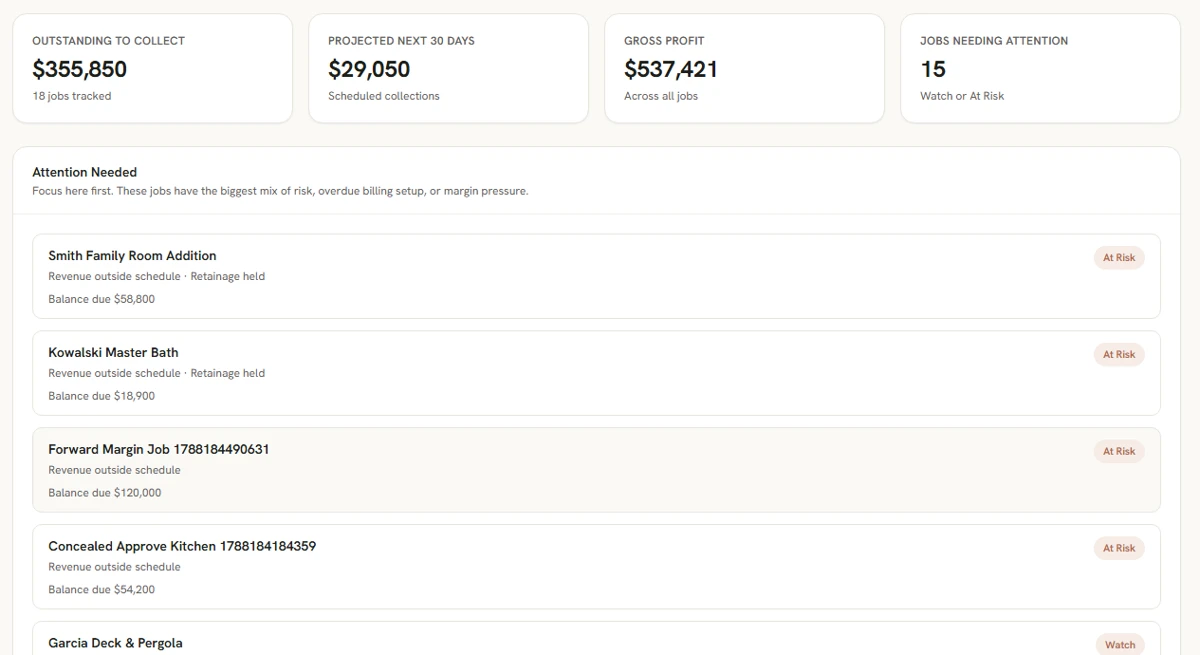
Scroll across to read the financials, or enlarge the screen.
Actual product screens use example data. Mobile capture and production handoff are labeled illustrations.
Less hunting. Less repeating.
A note in one place, a photo in another, a revised proposal somewhere else. Keep those pieces with the customer and job so the next person can pick up the work.
Keep the chosen product, customer confirmation, and contractor review together. Know which checks are still open.
Keep notes, photos, and reviewed updates close to the scope they explain, instead of rewriting the context in every conversation.
A missing selection or field check has an owner and a next step. Review the exception before it becomes a surprise.
Production gets the selected option, measurements, exclusions, files, and commitments that shaped the customer’s decision.
Notes, pricing, proposals, photos, customer conversations, and job costs share the customer and job context. You choose what to bring into ProTract.
Keep the company together
Mara needs to know where the money stands. Daniel needs a clean handoff. Eli needs today’s work. ProTract gives the office and the field a view that fits their role.
Make room for your teamAlder & Stone · Example portfolio
Customer history, follow-up, estimates, options, proposals, and signatures. Keep the conversation with the commitment.
Jobs, crew schedules, time, daily logs, photos, and files. The team can see what matters for today.
Estimates, labor, receipts, sub bills, invoices, and job profit. See the costs while the job is still moving.
Bring customer choices, allowances, product history, and field checks together. Reuse known products on later jobs.
At most three high-risk problems at a time, each with an owner and a next step. Unanswered questions stay visible.
Keep customer updates, team messages, and trade-partner details with the right customer and job.
Start with the work you already have
Use the 14-day trial to try ProTract with your own work. Start with one job, then add the details and people you need.
Keep its scope, files, and customer details in one place. Review supported spreadsheet imports in Settings if you’re bringing existing records.
Use an Excel or CSV rate sheet, pasted rows, or a photo of a price list. Review the proposed changes before saving company rates.
Invite your crew and choose their roles. Share relevant customer information through the customer portal.
The on-page walkthrough follows a fictional bath from captured notes to reviewed lessons. Prefer to ask about your company? Email a request to our sales contact.
Yes. Create a job and add its customer details, scope, photos, and files. Settings also offers preview and review of supported spreadsheet records before import. That import does not bring in invoices, payments, committed estimates, attachments, or team invitations.
Yes. Bring an Excel or CSV rate sheet, paste spreadsheet rows, or attach a photo of a printed price list, old estimate, or subcontractor quote. Review the proposed rates and resolve missing details before saving them. Your saved company rates take priority for matching work; unmatched work still needs pricing.
Invite team members and assign roles. Field crew can work with assigned jobs, schedules, time, logs, photos, and files. Financial access follows the person’s role; crew access does not grant the same view as an owner.
Share the customer portal for their project. Customers can review proposals and selections and access the information shared with them after verifying their access. The customer portal is separate from your staff workspace.
Use the in-app support form for product questions, bugs, billing, or account help. You can also email support@getprotract.com. For a product walkthrough, email sales@getprotract.com with your request.
Each company shares a daily allowance for preparing drafts and reading documents: Solo has 75 credits, Team 250, and Business 750. The trial has 750. A larger or more involved request can use several credits, so credits are not a count of completed tasks. Allowances reset at 00:00 UTC each day.
The on-page walkthrough follows the example Whitaker bath through capture, proposal options, selections, production handoff, and a closeout lesson. You choose the pace and can explore the product screens without an account. The guided walkthrough request opens an email draft to sales; it is sent only when you send it.
Simple monthly pricing
Choose your team size. Every plan starts with a 14-day trial. No credit card required.
A small, capable crew
Up to 2 users
Start freeKeep everyone connected
Up to 5 users
Start freeMore people, one place
Up to 15 users
Start freeTell us about your team.
All prices in USD, billed monthly. Cancel anytime. Draft preparation and document processing share a daily company allowance that varies by plan. See how the daily allowance works.
Make room for life outside the job
Give the details a home, the team the whole story, and yourself a clearer next step.
Start with the jobs you have today.